Day 91

Working from home today afforded me some extra time at the end of my day.  I didn’t have the drive home eating into my fading sunlight, although by the time I went outside the sporadic sun was behind a sky full of clouds.  I hadn’t planned any great adventure so I decided to go for another walk through the fields across the road from me.  There usually is something of interest to be found.

I realize it is only the top of goldenrod but today it was out shining the sun.  I have numerous pictures with the hazy sun in different positions in relation to my subject but I liked this one the best.  With the sun only providing weak ambient light I didn’t have to worry about hard shadows on the flower of the goldenrod and allowed me to still show the detail in the flower.

Day 90

Even though it is a lesson I am sure I will forget again it was important for me to suffer through it.  On Wednesday I was playing with the camera in the creek down the road from my house.  The last pictures I took where a three exposure bracket but I never changed the settings prior to putting the camera away.

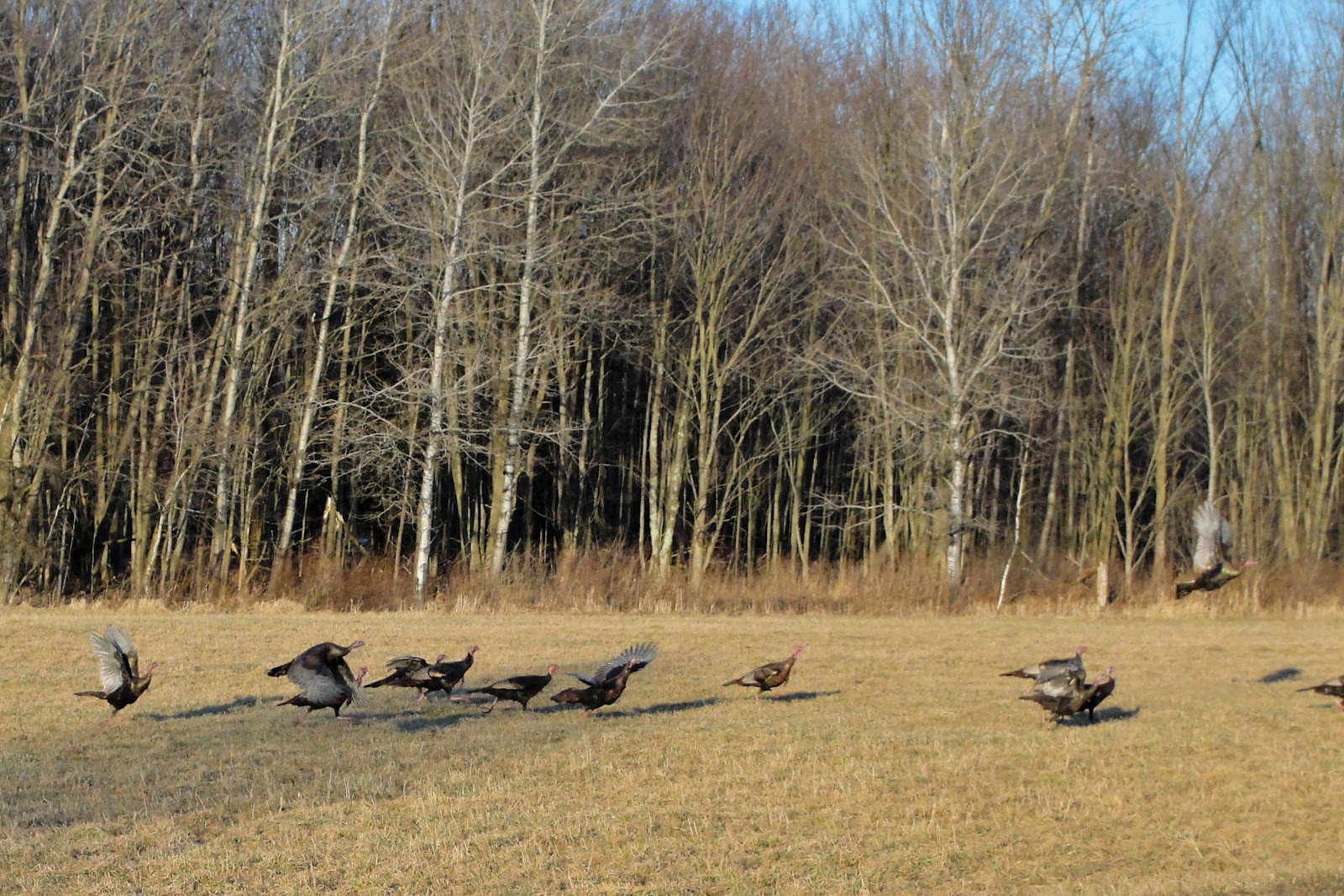
Move forward one day and I spot a flock of turkeys coming through a field on their way to cross the road (insert joke here).  I perform a quick u-turn in the road so I can grab a few pictures.  In the excitement to capture them I just turned on the camera, pointed it at the turkeys and clicked the shutter.  At the same time they made their dash and then short flight across the road.  That is when I realized the camera took three pictures, two of which where incorrectly exposed.  The turkeys were running so all three pictures had them in different stages across the field.  They were also too far away in the shadows of the woods to get any more pictures.  Lesson learned!

I was able to salvage one of the pictures.  The truly disappointing aspect of this lesson is I was unable to take any other pictures yesterday and when I spotted the turkeys I thought my day was saved.  Not a bad picture, but I would have loved to have clicked off a few more as the took flight and flew over the road.  Next time I should be better prepared.

Day 89

Today was another nice day but a little lacking in sun.  The clouds would not give up any of the sky.  I was going to have to spend some time tonight working on real work stuff so I cut out of work about thirty minutes early.  In the long run work wins because I generally lose track of time when working from home.

My plan was to head back down to the creek for more ice and water pictures before heading to the gym.  I remembered to take my little ten inch bendable tripod with me because I was thinking with the overcast sky I was going to get shutter speeds below my ability to hold the camera steady.  I also thought that with the white ice/snow against the darker stream bed I might need to use multiple exposures to achieve what I wanted.

I have about ten to fifteen different views to process but the one I really liked was of a huge ice sheet against shallow water with visible rocks.  I had the advantage of being able to setup about 4 feet above the ice on a large boulder.  I am really happy with the picture I created.

I captured a three bracket set at -1/0/+1 EV which luckily for me my camera can do by itself.  I brought the three images into Photomatix and used the Enhancer – Painterly option.  I left the sliders as set by this options but brought the final image into PS Elements to tweak slightly.  I adjusted the levels a little and added a high pass filter layer for just the ice.  I used the soft light blending mode for the filter layer.

The resulting image is a little more ‘enhanced’ than I typically work toward but I think it works by highlighting the structure within the ice.  The painterly option for the enhancer mode in Photomatix helped bring the stones on the creek bed into view and I think they contrast with the ice nicely.

Time to go see if I can create anything else with the other pictures I captured today…

Please feel free to leave comments, suggestions or critiques.  Thanks.

Day 88

Once again I end with a picture I did not start out with for my project picture.  There was a beautiful sunset again tonight and I was over in town just before it hit the horizon.  I intended to get another picture of the Rome Cable tower with the clouds and setting sun behind it.  I had captured a similar view early in my journey with photography and thought I could improve on it with my new knowledge.  I guess I have more knowledge to gain.

I just couldn’t get the pictures to look the way I wanted.  I was having a problem with noise due to the JPEG file format output by the camera.  I worked at it far longer than I probably should have but I was determined to get a better picture.  Eventually I turned to another picture to step away from my problem.

I had a picture I initially considered a throw away.  I snapped it while waiting for the sun to move into position.  I had no plans to process it but once I uploaded all the pictures to my computer there was a simplicity to it that I liked.  The picture was basically monochrome to start which made my processing choice fairly easy.

It was just a stack of truck tires behind a parked truck but I really liked the detail in each tire.  There was a lot of texture in all the elements of the picture and it was easy to make the whole scene ‘pop’.  I’m beginning to appreciate the possibilities of monochrome pictures.  I have been on a recent run of B&W processing but the images are turning out pretty good.

Day 87

It was another beautiful day here in Upstate New York.  Even though my office is in the basement without any windows it was hard to work until quitting time knowing what a nice day was passing me by outside.  As soon as the day was done I grabbed my stuff and headed for some pictures.  I wanted to try capturing the water flowing over the small dam on the Oriskany Creek.  The light wasn’t the best but I took multiple exposures to try to compensate.

I used Photomatix to combine the three exposures using the tone mapping process.  I few small tweaks to enhance the color and then a pass through DeNoise 5 to clean everything up.  The picture turned out better than I expected, still not as good as I have seen online but I’m learning…

Day 86

It was a quick trip weekend.  We ended up leaving our house around 11:30am to make the 2.5 hour trip to my mother-in-law’s house.  We spent time with my brother-in-law and his family which was half the purpose for our trip.  My wife’s older sister also came over to visit with us and brought the 4 month old black lab we gave her around Thanksgiving.  Love that dog!  That was the other reason for our trip this weekend.  It all worked out well and was a nice weekend to do some driving.

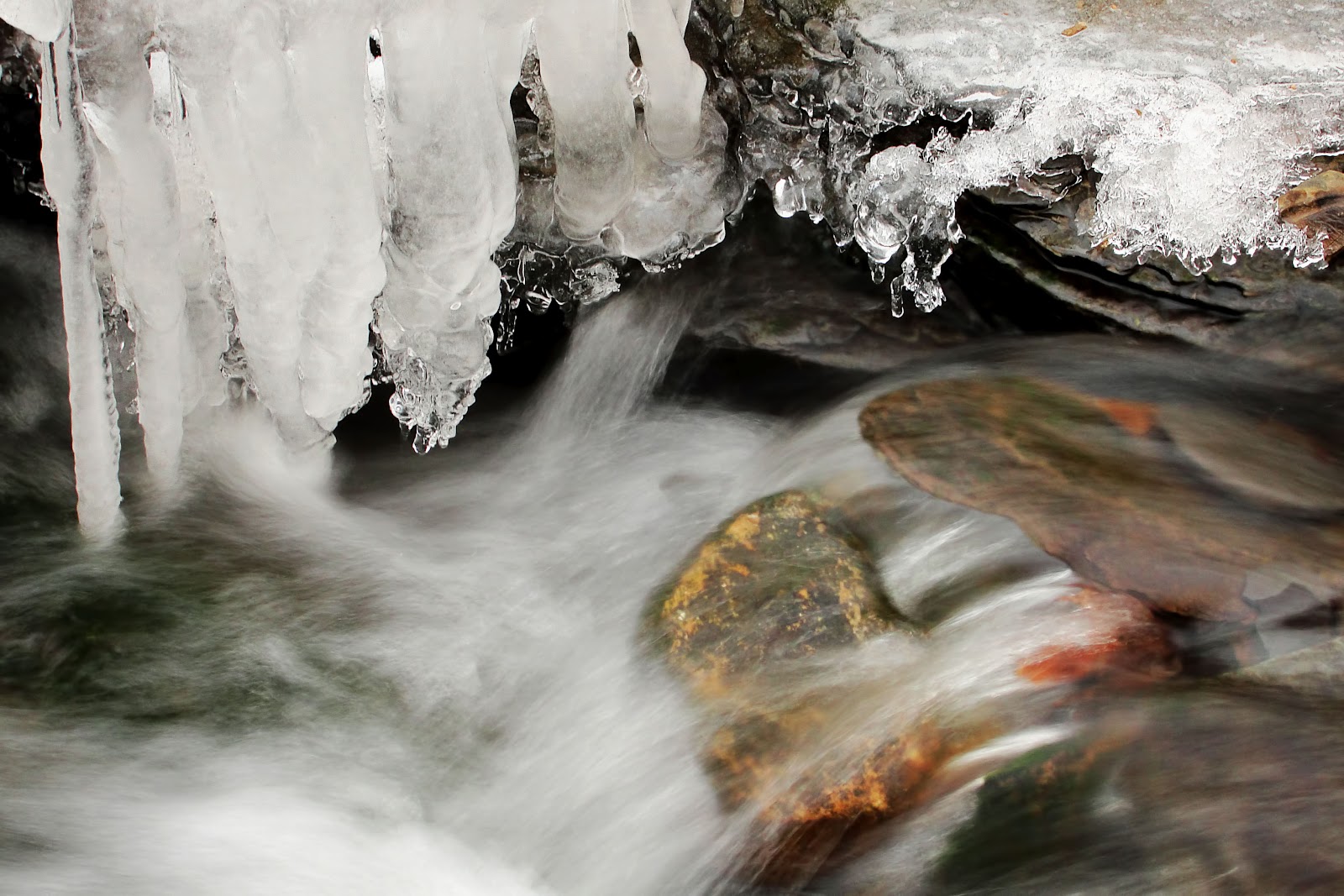
We returned home by 3pm which left me with some time to go out playing with my camera.  I made a fast grocery run to get our supplies for the week and still was in the woods by 4pm.  The Daily Shoot assignment for today was about liquids and I read a blog post about photographing water and ice.  This all pointed me in the direction of the stream in the woods just down the road from my house.  The sun was out providing just enough light to make this a challenge but luckily for me the stream is down in a ravine which blocked any direct sunlight.

I had a great time exploring the stream looking for interesting combinations of ice and water flow.  I was hoping I could slow my shutter speed enough to get the water to look smooth.  I wasn’t able to get that glass look that I have seen in some pictures but I’m happy with the effect I did manage to capture.  There was a huge assortment of ice formations which made selecting just one picture a little tough for me.  The one I selected had some nice colors in the rocks just below the water.

I stayed away from a lot of heavy processing with this picture and tried a few new techniques I learned recently.  I edited the picture in PS Elements 10 which I am learning more about every day.  I cropped the picture to the 2×3 ratio which removed some unwanted areas in the top of the original.  Due to my camera only saving in the JPEG format I ran the picture through DeNoise 5 to clean it up.  I then adjusted the levels and increased the saturation slightly.  The last enhancement I made to the picture was to create a layer mask for the ice and a high pass filter to just the ice portion of the picture.  I learned this technique from Nick Gatens yesterday and not only did I discover more about Elements it allowed me to enhance the detail of the ice formation.

I have a couple of dozen more pictures involving the stream and the water/ice theme I need to process.  I had a great time trying to capture these pictures.  I’m almost hoping we get a little more winter so I can try this again.

Day 85

I was determined not to miss the morning sun today.  We ended up getting a dusting of snow last night after the freezing rain stopped.  There really wasn’t enough to worry about but I view it as exercise so I shoveled the driveway.  Actually I pushed the snow from one side to the other with my 4 foot pusher shovel.  Hey, I was out at 7am walking back and forth which is exercise, right?

The sky was full of clouds when I started but as I finished up you could see the sun start to work its way through.  My plan was working.  I grabbed the camera and went for a short walk.  I managed to get quite a few nice pictures and even captured a bracketed set to show off the colors in the sky.  The picture I liked for my project was a macro of the property marker on the corner of our yard.  It is just a rusted piece of rebar but I like the texture and color against the sky.

We are heading down to my wife’s family farm today to visit with her sister and meet her brother to exchange a few things for our nephew.  I usually have a good time down there with my camera so I’m looking forward to a nice day.  I just hope the weather holds.

Day 84

Wow, I have been home for over four hours and just worked my way to my project picture.  To be honest I grabbed a few pictures of the birch tree at work because of the sunlight illuminating it against some great clouds but was anticipating going for a walk when I got home.  As I’m pulling in the driveway the freezing rain was just beginning.  The birch tree was going to have to be the picture.

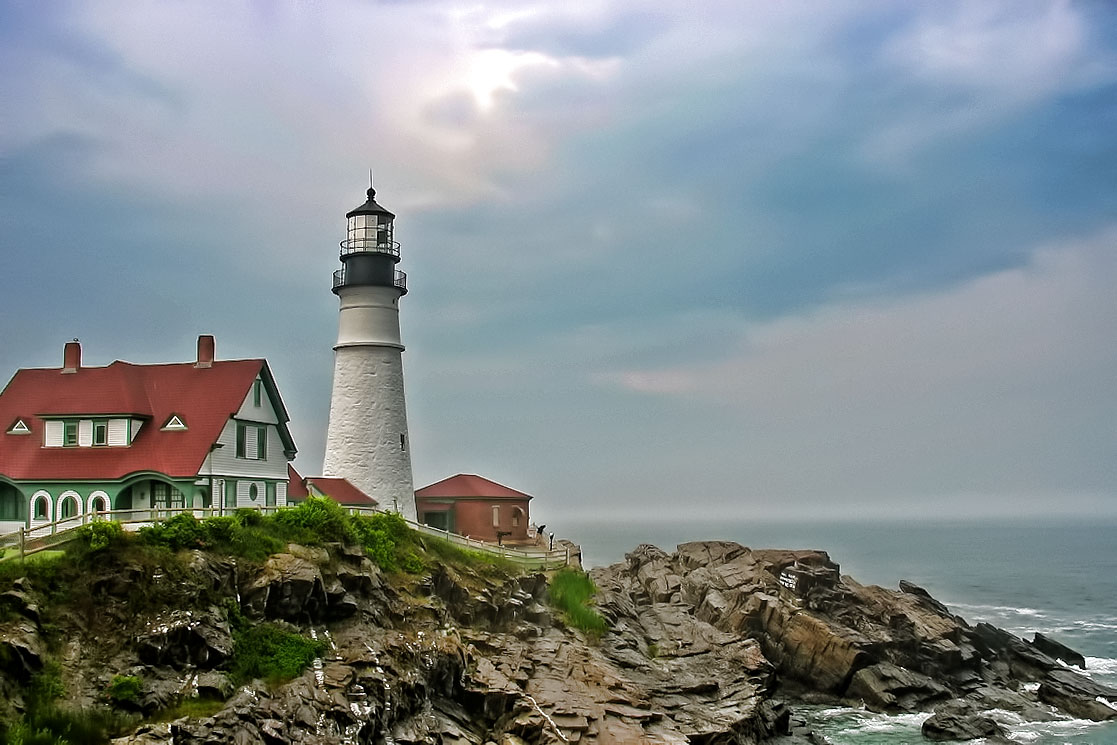
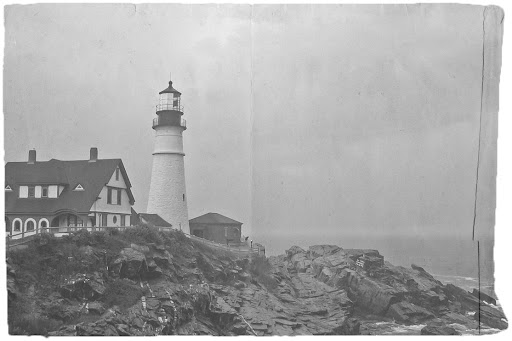
My 4 hour distraction started when I spotted the ‘Hack This Photo’ post with a picture of the Portland Head Lighthouse.  This is a lighthouse I have visited a few times and photographed myself.  I haven’t participated in this photo editing challenge before but couldn’t resist the subject.  I worked the picture through processing a couple of different ways and ended up learning quite a bit more about Photoshop Elements and processing possibilities.  I have included the two pictures at the end of the post.

The birch tree picture I used for my project is very simple but has great detail within the tree and nice colors provided by the blue sky showing through the white/grey clouds.  The processing on the birch tree was done completely within Lightroom and kept fairly simple.  I think I managed to get quite a lot of it right in camera.

For comparison, here is the SOOC picture:

The first of my distractions for the ‘Hack This Photo’ page was processed very normally for me.  I minor adjustment of the levels, a pass through DeNoise 5 and then a final pass through Adjust 5.  I selected the Dynamic Brightness preset from the HDR Collection to get me started.  I needed to tweak a few of the settings to achieve the look I wanted.  I like what I ended with, but as I mentioned earlier, very normal for me.

I wanted to get out of my comfort zone and try something new.  I decided to edit the picture again this time learning how to apply a texture and create a picture that looked more vintage and aged.  I had just read a post from Melina Ilieva on how to add a texture and create a vintage look for the picture.  This is the article I followed: How to make a photo look like an old photograph.

I am really happy with the way this second picture turned out and I was able to learn a few new things about Photoshop Elements.  This gives me more options when I’m out exploring with the camera.  I have a new trick in my bag…